A day at an accounting firm, with and without AI
The same day at a small accounting firm, with and without AI: fictional emails and figures, with drafts that still need the accountant’s review.
Four client emails arrive before Marta has opened the report she needs to finish. She runs a five-person accounting and business-advice practice in Alicante, Spain. A client meeting is booked for Thursday, and the team needs to prepare the material.
Marta and the practice are fictional. The emails and six months of figures in this July workday are synthetic examples. This is a way to examine AI for accounting firms through familiar tasks, with no claim that a customer followed this routine or saved a measured amount of time.
Eurostat reported that 20% of EU enterprises with at least ten employees or self-employed people used AI in 2025. That broad business measure excludes a practice of Marta's size and does not establish which accounting tasks work well. A useful assessment starts with the work you need to deliver.
The day without AI: assembling each part of the job
Without generative AI, Marta sorts requests, checks sources and prepares the client material using email, a browser and ordinary office software. The accounting system remains the place to verify the records, while writing and presenting the explanation is a separate task.
First, the inbox. Client A suggests a sales review on Thursday 9 but has not sent the figures. Client B has spotted two lines labelled FAC-042 and wants to know whether an invoice has been duplicated. Client C wants a reply by Tuesday 7 confirming receipt of the document they sent the previous day. Client D needs to change the address on their invoices without saying when the change should take effect.
Marta reads the messages and notes the explicit dates and missing information. She needs to see the two FAC-042 entries before calling them a duplicate: one could be a credit note. She checks the inbox and client file before acknowledging receipt of a document. Then she writes the replies, leaving questions open where the evidence is missing.
Later that morning, a source check. A colleague asks where to verify the information required on an ordinary Spanish invoice. Marta finds the invoicing regulation in the BOE, Spain's official gazette, and the Spanish Tax Agency's guidance. She checks which version applies and prepares a short note with links for the team.
Before lunch, the report. For a separate client review, she has a six-row spreadsheet of sales and operating expenses. She adds the columns, compares the last two months and writes some observations. She moves the table into a document, checks the page breaks and saves a PDF.
In the afternoon, a chart. Marta returns to the spreadsheet to plot both series. She keeps the months in order, uses euros for both measures and checks that nothing has been left out. The chart will support a discussion: the spreadsheet alone cannot explain why sales changed.
Finally, the firm's LinkedIn post. She wants an illustration for a short post about monthly review meetings. She looks for a suitable image she can use, or makes a composition in a design tool. No client report should appear in the image. She still needs to review and publish the post.
The accounting work has its own tools. These scenes cover the additional work of preparing, explaining and presenting it.
The same day with AI: giving the draft a clear brief
An AI workspace can prepare a first draft from the text and files Marta supplies. She sets the requirements for each output and checks it before using it with a client.
Turn the selected emails into a working list
Marta pastes the four fictional emails into the chat. She asks for a table containing each request, any explicit date, the next action and the information still needed. A reusable English adaptation of the instruction is: “Do not invent priorities, statutory deadlines or attachments.”
In the trial, Ilisai put A and C in the group with explicit dates, Thursday 9 and Tuesday 7, and B and D in the group needing clarification. It also drafted a Spanish reply about FAC-042 without claiming an invoice had been duplicated. The draft asked whether either entry might be a credit note.
That wording needs a human edit: B had already said they did not know. Asking for the two entries or supporting documents would give the practice something to check. The table also proposed confirming receipt to C and marked the missing information as N/A, although the chat had not established that the document arrived.
Marta checks that receipt in her email and revises the draft. Ilisai has worked from the selected text; it has not opened the inbox, inspected the client file or sent a reply.
Find the sources behind the invoice question
For the research task, Marta asks where to check the required contents of an ordinary invoice in Spain. She restricts the search to the BOE and the Spanish Tax Agency, requesting exact links and a short explanation of what a professional should verify in each source.
The response linked to Royal Decree 1619/2012 and directed the reader to Article 6. It also found the Tax Agency's ordinary-invoice contents page in its 2025 VAT manual. We opened both destinations and checked that they supported the brief descriptions returned. The manual's edition is part of the applicability check.
Marta opens the sources and checks the applicable text and exceptions before advising anyone. The BOE itself explains that its consolidated text is informative and that the official publication should be consulted for legal purposes. The exercise helps her find material to review; it does not resolve a client's tax position. Firms outside Spain would need the appropriate sources for their own jurisdiction.
Ask for a report with a defined scope
The report starts with a synthetic CSV covering January to June and two amount columns: sales and operating expenses. All values are invented for the example.
Marta requests downloadable Word and PDF files containing the original table, totals, a June-versus-May comparison and three questions for the client meeting. She asks for a visible fictional-data label and a note about the information the file does not contain.
Our trial caught a source-data error in the first files: they showed June sales of €23,000 and expenses of €15,800, while the CSV contained €21,800 and €15,700. The totals correctly added the altered rows, so checking the arithmetic alone would have missed the problem. The PDF also dropped several Spanish accents.
After several corrections in the chat, we checked both final files against the source: all six rows matched, with €119,800 in sales, €88,200 in expenses and a €31,600 arithmetic difference. We also checked the May–June comparison, Spanish characters and euro symbols, then opened every page. Both final reports are one page long and visibly labelled as fictional examples.
Download the same Spanish sample report as a Word document (DOCX) or PDF.
The terminology needs particular care. Subtracting the supplied expenses from sales does not, by itself, establish profit or cash flow. This file has no taxes, depreciation, inventory movements, cash receipts or payments. Marta checks the numbers and labels, then downloads the document to review its presentation before sharing it.
This is a task for the AI document generator: specify the content, request a format and inspect the file you intend to deliver. The input here is a CSV and written instructions; there is no Word document to upload.
Use the chart to prepare better questions
Using the same file, Marta asks for an interactive chart in the chat with monthly sales and operating expenses, both in euros, and a vertical axis starting at zero.
The first result carried over the June error. After requesting a correction, we opened the chart's data table and checked all twelve amounts against the CSV. The six months appear in order, with both series and a zero baseline. The capture in this article is a static image of that corrected chart; the interactive version is in Ilisai.
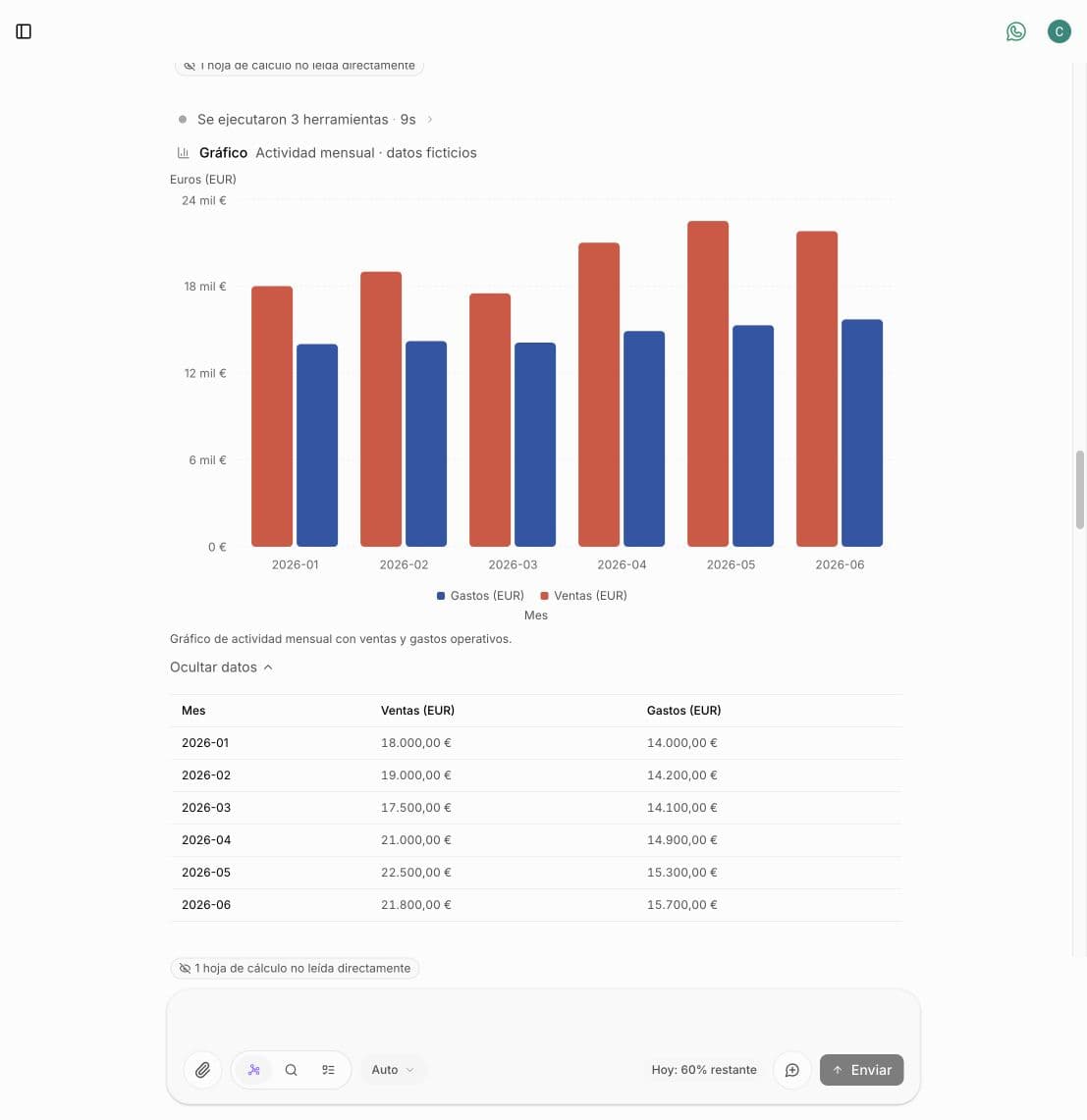
Static capture from the Ilisai QA trial, using fictional January–June 2026 figures. The interface is in Spanish.
The two final rows deserve a closer look:
| Synthetic measure | May | June |
|---|---|---|
| Sales | €22,500 | €21,800 |
| Operating expenses | €15,300 | €15,700 |
| Sales minus supplied expenses | €7,200 | €6,100 |
Sales fell by €700 while operating expenses rose by €400. Those calculations describe the fictional file. To explain the change, Marta would need transaction details and confirmation that the months include comparable items.
The guide to AI for business intelligence and data analysis covers the checks behind this kind of work: agree the measure, inspect the data and separate an observation from a cause. A chart built from an uploaded file does not update itself when the accounting system changes.
Create an illustration without borrowing a client's report
For LinkedIn, Marta asks for a square editorial illustration: a desk seen from above, notebooks, a calculator and an abstract chart. The brief specifies no readable figures, people, logos or client information.
The generated image contains two notebooks, the calculator and a sheet of abstract lines and shapes, in ink blue, sand and coral. We inspected the downloaded file: the sheet has no legible figures or client data. It provides an illustration for the meeting topic.
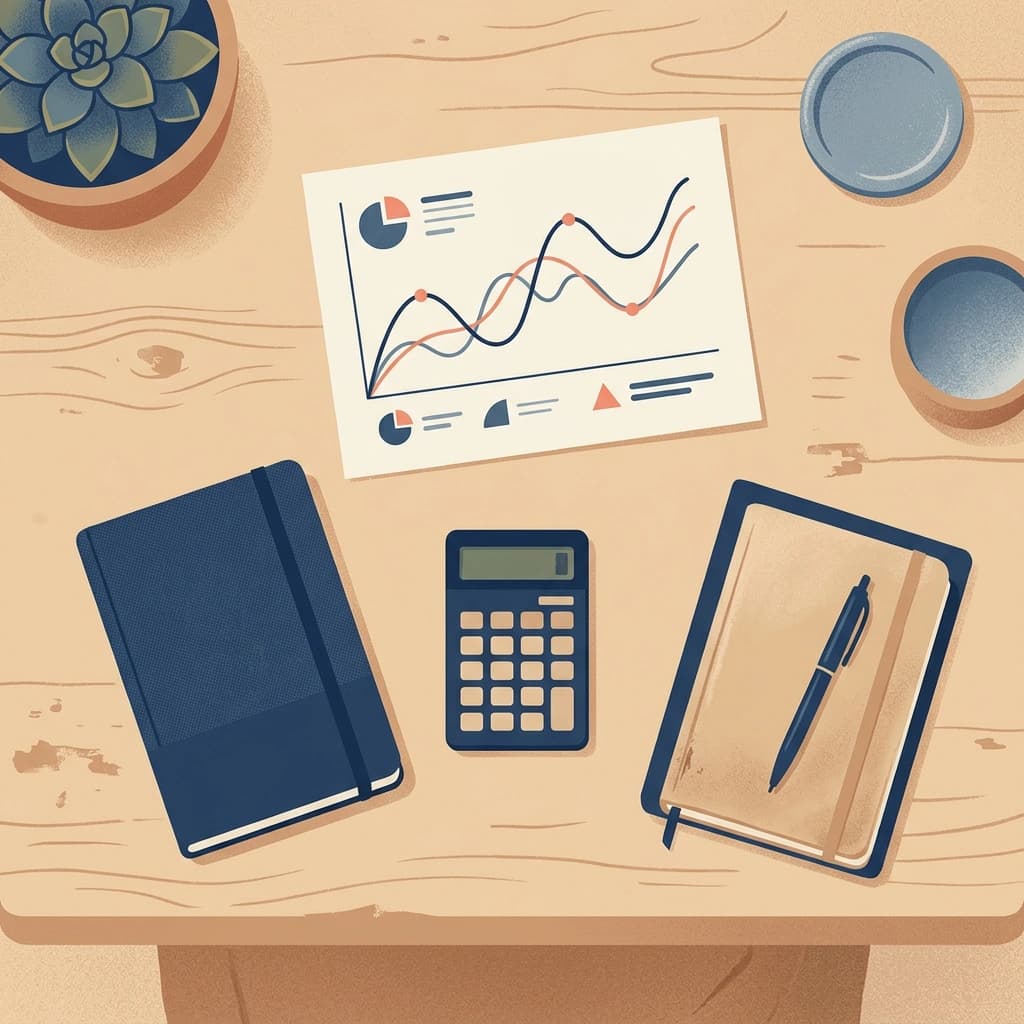
Illustration generated in Ilisai for this fictional accounting-practice post.
She reviews the generated image, finishes the post and decides whether to publish it. The image should be presented as an illustration, without suggesting it is a photograph of the practice or evidence of a client's results. Generating it does not schedule or publish the post.
The checks that stay with the accountant
The accountant chooses the input, verifies the output and authorises anything sent or filed. AI-assisted drafting retains those responsibilities and adds the need to check the model's contribution.
Before supplying real information, the practice needs to decide what it can share with the chosen service and on what terms. Synthetic material is enough for a first exercise. Replacing a client's name alone may still leave them identifiable through other details.
The checks in Marta's day are specific:
- Verify receipt of a document or the existence of an error before stating it in an email.
- Open the research sources and check the applicable text.
- Reconcile the report's figures, labels and omissions with its input file.
- Check the chart's periods, units and series.
- Review the image and the context in which it will appear.
Ilisai does not connect to the accounting system in this example, post entries, run payroll or submit returns. Those operations need specialist software or a suitable integration and their own controls. The workspace will not pick up tomorrow's incoming emails by itself either.
What changes in a 50-person firm
At a 50-person firm, management needs common rules for approved tools, permitted data and the person who signs off each deliverable. A shared workspace can be part of the arrangement, provided its access model and service terms fit the client work involved.
The first trial can still be a report like Marta's. Across several teams, however, everyone needs the same definition of sales, an agreed set of instructions and a clear owner for questionable figures. The source file and approved report should stay in the firm's designated records.
Larger organisations also need to assess user access and removal, separation between clients, retention and supplier terms. These are requirements to verify during procurement. The example does not demonstrate client-file access controls, a complete audit trail or a private Ilisai deployment.
Start with one deliverable you can check
For a small accounting practice, start with an AI-assisted task you can review in full, such as a draft email or a report built from synthetic figures. Compare the complete effort, including preparing the input, correcting the result and reviewing it, before expanding the trial.
Ilisai brings cited research, writing, downloadable documents, file analysis and image generation into one workspace, with a choice of available models and credit-based usage. In Marta's day, it works on the material she supplies. Check pricing for current allowances and options, and the generative AI for business guide for the wider range of tasks.
Pick one scene and judge the result after your own review.